

What is this strategy?
This strategy focuses on using reference materials in your Playlab app to improve its knowledge base. By uploading documents or adding links, you can give your app access to specific information that helps it generate more accurate, relevant, and customized responses for your users.Think of references as giving your Playlab app a specialized library of knowledge that it can draw from when answering questions.
Why It’s Important
References are key to building apps that have specialized knowledge beyond what the AI already knows:- Ensures responses align with specific, verified information
- Tailors content to your exact curriculum or teaching standards
- Provides rich context for more comprehensive answers
- Allows incorporation of up-to-date information through external links
- Enables creation of school-specific or organizational content
How to Add References
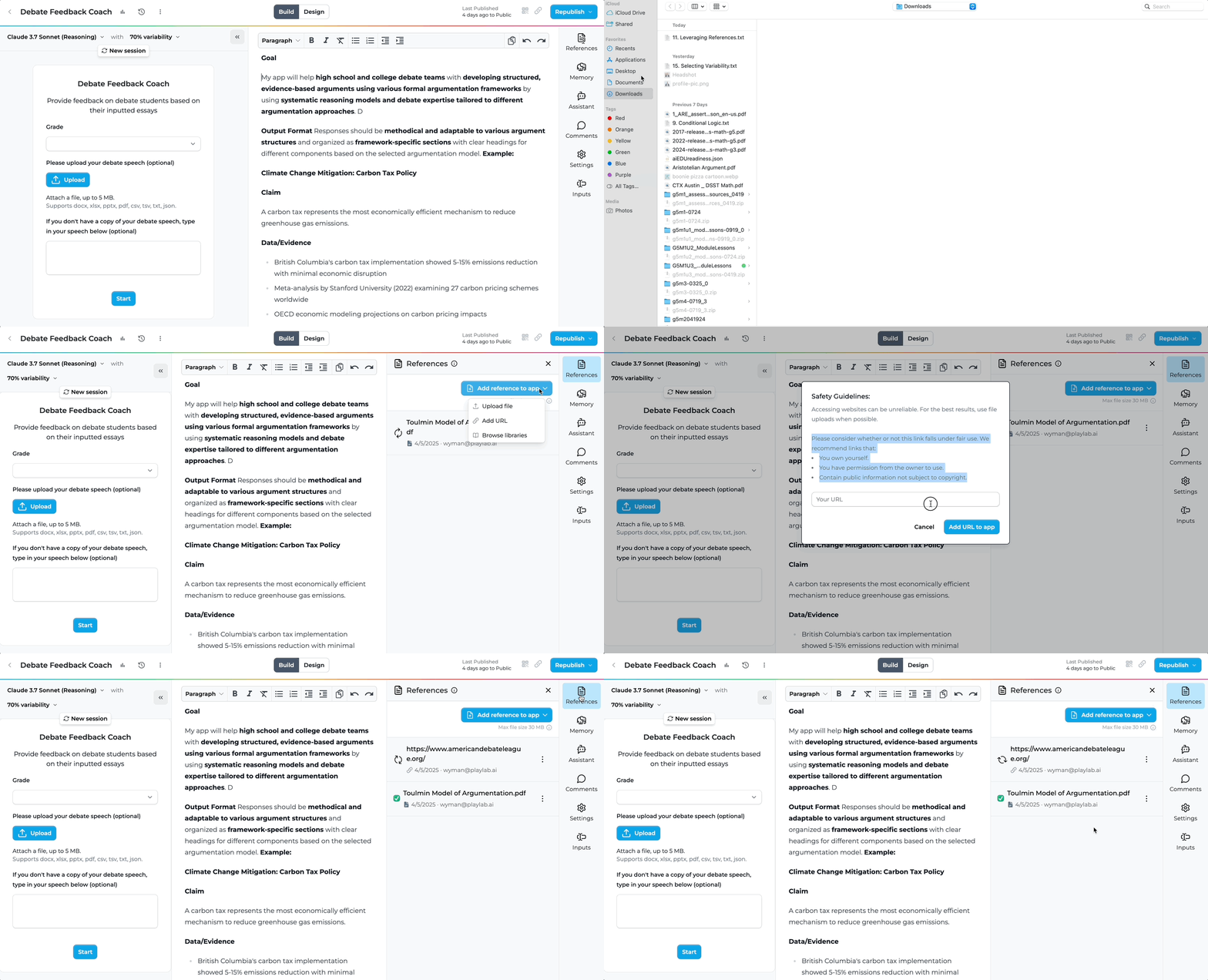
1
Prepare Your Reference Materials
Choose the Right Format:
- PDFs work well for maintaining formatting
- Markdown for structured text
- Well-organized text files
- Links to external resources
- Break large documents into smaller, focused files
- Ensure clear formatting for easier AI parsing
- Tables and structured formats are easier for the AI to understand than long paragraphs
2
Upload References in Playlab
While in the Playlab app builder: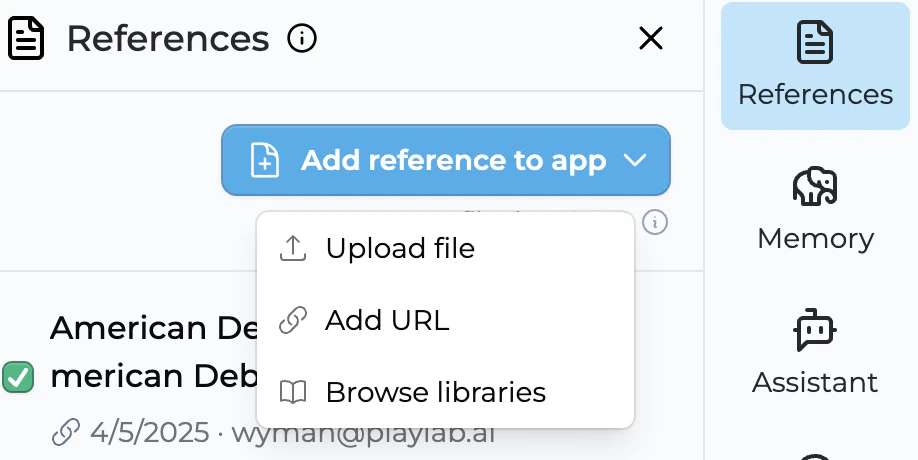
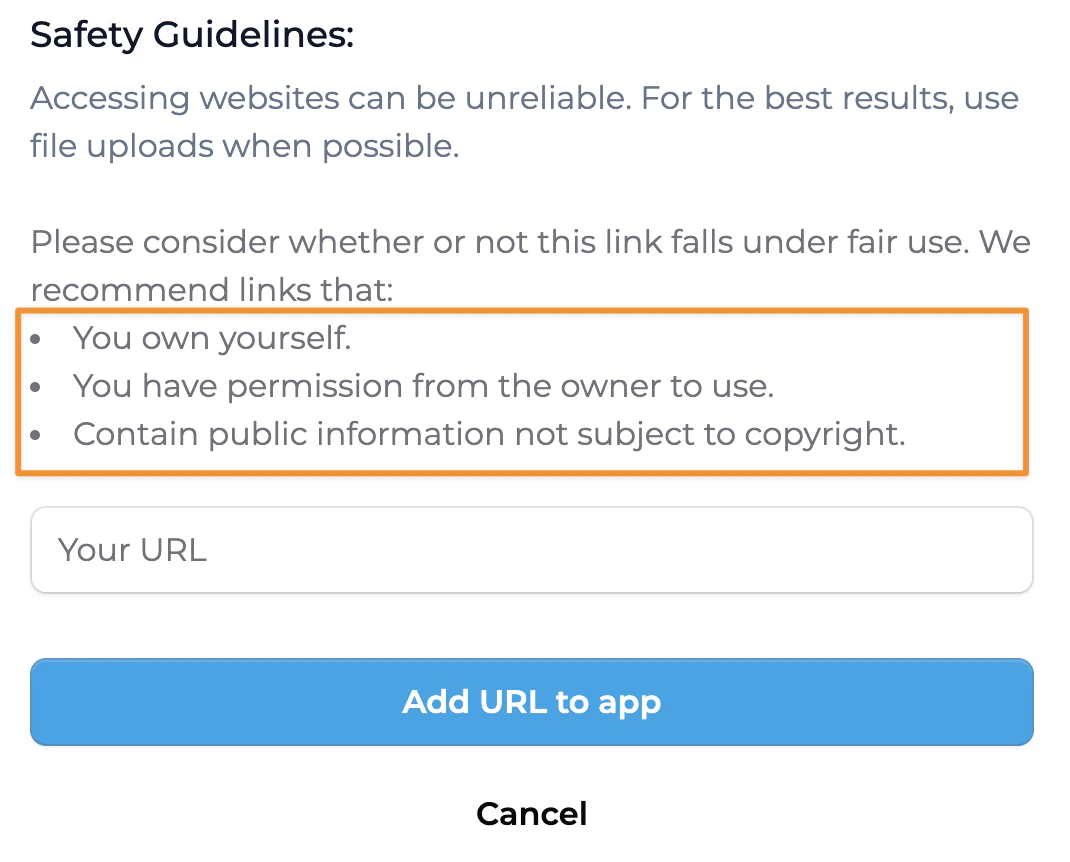
- Navigate to the References section
- Click “Upload” to add document files or “Add Link” for web resources
- Give each reference a descriptive name
- Make sure you have permission to upload the references.
3
Guide Your App to Use References
In your app instructions, specify how and when to use the references:Example Instructions:
- “Use the lesson plan document to create activities that align with our school’s 4th-grade science curriculum.”
- “When answering questions about classroom management, refer to the discipline policy document.”
- “Based on the provided state standards document, generate grade-appropriate math exercises.”
4
Test and Refine
- Try your app with references enabled and disabled to see the difference
- Check if outputs mention or incorporate information from your references
- Adjust your instructions if the references aren’t being used effectively
- Add or remove references based on performance
Content Protection for Uploaded References
Files and references you upload into Playlab are protected from extraction or download.- Other users cannot download your files. Once a reference is uploaded, the original file cannot be downloaded from your app.
- Editors see the files listed, not what’s inside. Editors who have access to your app can see the files you have uploaded, but they cannot download the files or view what is inside of them.
- App users access references only through prompting. People using your app will see parts of your references based on how they prompt it. They never receive the underlying files.
Reference Use Case Examples
Educational Applications with References
Key Implementation Strategies
Choose Quality References
Choose Quality References
- Select authoritative, accurate, and relevant materials
- Focus on resources that directly support your app’s purpose
- Consider the credibility and currency of information
- For educational apps, use official curriculum documents, textbooks, or verified teaching resources
Be Explicit in Your Instructions
Be Explicit in Your Instructions
- Clearly direct the app to use specific references for specific tasks
- Example: “When creating vocabulary exercises, refer to the word list document”
- Specify which sections of longer documents are relevant for particular questions
- Tell the app how to prioritize different references when they contain overlapping information
Combine Reference Types for Better Results
Combine Reference Types for Better Results
- Mix document types for comprehensive coverage
- Example: Combine curriculum standards, lesson plan templates, and content resources
- Use structured references (tables, lists) alongside narrative content
- Include both broad overview documents and detailed specific resources
Regularly Update Your References
Regularly Update Your References
- Review and refresh materials to ensure accuracy
- Update seasonal or time-sensitive content
- Replace outdated information with current resources
- Add new references as curriculum or requirements change
Frequently Asked Questions
How many references should I include?
How many references should I include?
Start with 3-5 core references that cover your app’s main functionality. Quality is more important than quantity - each reference should serve a clear purpose. Too many references can actually make it harder for the app to focus on the most relevant information.
What file formats work best for references?
What file formats work best for references?
PDFs, markdown files, and well-structured text documents work well. For tabular data, CSV files or documents with clear tables are ideal. The AI can parse most common formats, but clearer structure helps it understand the content better.
Should I test my app with and without references?
Should I test my app with and without references?
Yes! Toggle the reference setting on and off to see how it impacts your results. This helps you determine if your references are actually improving the outputs or if they might be confusing the app.
How do I know if my references are being used effectively?
How do I know if my references are being used effectively?
Look for specific information from your references appearing in the app’s outputs. The responses should be more specific, accurate, and aligned with your provided materials. If you don’t see evidence that the references are being used, try adjusting your instructions to more explicitly direct the app to use them.
Need Support?
Have you created an app using references? We’d love to hear about your experience!Contact us at support@playlab.ai